While attending 39C3, I had some time to play the yearly hxp CTF. The hardest web challenge was CatGPT, which involved auditing a common PHP library for gadgets and applying them to a very interesting case. We'll explore a JavaScript injection where the usual techniques don't work, and through lots of restrictions, barely work out an exploit.
The Challenge
We get the full source code for this challenge to run it locally with docker compose up, and find quite a simple application:
├── Dockerfile
├── admin.py            <--
├── compose.yml
├── docker-stuff/
│── ...
├── flag.txt
└── www/
    ├── auth.php
    ├── composer.json
    ├── composer.lock
    ├── config.php
    └── html/
        ├── index.php   <--
        ├── login.php
        ├── logout.php
        ├── stats.php   <--
       ...
The important thing for this CTF challenge is where we find the Flag. In admin.py, we can read how a headless browser logs into the website.
...
=
=
=
=
=
# Will redirect to stats.php
In contrast to most client-side web challenges, however, the bot does not visit our arbitrary URL. We have to find some Stored XSS.
To do so, let's look at the PHP source code. When we simply visit index.php, our User-Agent: header is taken and parsed using DeviceDetector before some of its fields are saved in the database.
In stats.php, things get more interesting. All visits in the database are displayed in a table set up using a JavaScript datatable library. This page requires authentication through auth.php, which simply checks if the session from login.php was set. We cannot do this yet without the admin's randomly generated password.
The bot administrator will visit this page. So if we can poison it with some malicious user agent, any of these reflections may allow us to inject HTML/JavaScript in order to perform Cross-Site Scripting. Then, the $flag should be on the same page.
The hard part is that not our raw User-Agent: value is reflected, but instead, only some parsed fields like os_name, os_version, client_name, and client_version. We'll have to investigate the library in order to find whether or not these fields give us enough control to escape our context.
DeviceDetector
Inside the foreach loop, a JavaScript array is defined with double quotes ("). Inside here, the os_name and client_name are both reflected, which sounds useful. But htmlspecialchars() HTML-encodes them. If we tried to escape the " context with a payload like "-alert()//, this would be transformed into "-alert()//.
Note: Through this filter it is still possible to use backslashes (
\) escapes to write arbitrary characters into the string, like\x41becomesAor more interestingly,\x3Cbecomes<. This is, however, not useful in this challenge as GridJS safely renders the strings without interpreting HTML (only usinggridjs.html()).
The os_version and client_version are more promising since they are not escaped, but version numbers sound like they should be pretty restricted to only numbers and dots. How does DeviceDetector extract these version numbers from our user agent string?
Well, in the repository we can find Regular Expressions for oss.yml and client/ which have patterns like this:
- regex: 'TitanOS/(\d+[.\d]+)'
  name: 'Titan OS'
  version: '$1'
- regex: 'eulerosv(\d)r(\d+)'
  name: 'EulerOS'
  version: '$1.$2'

- regex: 'Chrome(?!book)(?:/(\d+[.\d]+))?'
  name: 'Chrome'
  version: '$1'
Here the regex defines any amount of capture groups, which are referenced using $1 or $2 in the version. Only these can be output, so we'll have to look for regexes that capture more than they should and reference them in the version.
Instead of doing this manually for 1700+ entries, we can write a script that parses and checks all RegExes automatically.
At first, I tried looking for a common mistake, an unescaped . inside the RegEx which means any character. I later noticed, however, that many of the capture groups where I'm looking for mistakes are the same. Instead of trying to implement all possible mistakes, we can simply only print the unique capture groups and manually look through the few that come out of this.
sre_parse in Python's standard library can parse Regular Expressions into an Abstract Syntax Tree (AST), which we can then traverse to find what we're looking for. Whenever we find a subpattern we can add it to a list to then evaluate what its version must match.
=
=
+=
=
+=
+=
+=
return
=
# Try to find group in regex subpatterns
=
return # If referenced group not found, return empty string
return # NOTE: we will change this later
Finally, we will group these uniquely to only show a few results for us to review.
=
# Some entries have multiple versions
=
=
=
=
=
# Replace the $1 references in version with their capture group definitions
=
=
In results.txt, we now find a unique list of version patterns and what OS/Client defined them.
12: ['Bliss OS', 'Android']
8\.1: ['Windows RT', 'Android', 'Windows', 'iOS']
[(MAX_REPEAT, (1, MAXREPEAT, [(IN, [(CATEGORY, CATEGORY_DIGIT)])])), (MAX_REPEAT, (1, MAXREPEAT, [(IN, [(LITERAL, 46), (CATEGORY, CATEGORY_DIGIT)])]))]: ['Coolita OS', 'Coolita OS', 'ViziOS', ...]
[(IN, [(CATEGORY, CATEGORY_DIGIT)])]: ['Azure Linux', 'Proxmox VE', ...]
...
We are still printing the raw AST for each capture group, which isn't the easiest to read. Wanting to convert this AST back into a readable RegEx is harder than it sounds, however, because the sre_parse library unfortunately does not provide this functionality. We'll have to implement this ourselves with a basic recursive function that's far from perfect, but does the job. We can take a reference from the challenge's name, "CatGPT," and let "ChatGPT" implement this.
All we have to change now is to call the ast_to_regex() function that it generated and enjoy our readable RegExes.
...
return
[\d]+[\.\d]+: ['Coolita OS', 'Coolita OS', 'ViziOS', ...]
[\d]: ['Azure Linux', 'Proxmox VE', ...]
We will get back to finding exploits in these results in a second, but before that, I want to show how we can find similar flexible patterns in the name field as well. This works the same as the versions, referencing capture groups with $1 from the RegEx in some cases. But the names are, of course, different for basically every OS/Client. We can't use our deduplicating trick here.
So how do we find interesting patterns here? Well, we can just use the fact that not many names have flexibility in the first place. Most are defined statically, like "Windows" or "Chrome". A simple global code search for name: .*\$ shows just a few candidates we can manually look at the regex for to find out if the capture groups look useful.
Gadgets
So, let's get back to exploiting. For the version, we find around 50 actually interesting RegExes. Looking through these, the one below may jump out:
[\d]+.[\d\.]+: ['moonOS', 'Pardus', 'Roku OS', 'Roku OS']
In comparison with the other number-dot-number RegExes, this one makes the mistake of using an unescaped dot (.) intead of a literal one (\.). That means between the two numbers in the version we are allowed one arbitrary character, like 1a2, or more useful for us, 1"2!
The OS we need to define for this looks like:
In stats.php, this will now be rendered as:
new;
We break out of the string as seen by the weird syntax highlighting, but we quickly hit another issue, as the second number in our version will always follow our injected closing ". This will never be valid JavaScript syntax, so we cannot write malicious code (a SyntaxError always happens before starting to run any code). Reading the regex [\d]+[\.\d]+, we should be able to make the last digit a . too, will that help?
Huh, where did our . go? This is still invalid syntax, but the library seems to strip trailing dots from version numbers. In this case, it allows us to do one more trick: end with a \. Instead of closing the quote ourselves, always causing a SyntaxError, we will explicitly not close this string by escaping its ending quote. It will continue until the next double quote:
Remember from the PHP code, this "Unknown" is the fallback for the client_name, for which we also found some gadgets. Maybe one of them allows us to turn this confusion into valid Syntax.
- regex: 'Podkicker( (?:Pro|Classic))?/([\d.]+)'
  name: 'Podkicker$1'
  version: '$2'
- regex: '(?:Microsoft Office )?(Access|Excel|OneDrive for Business|OneNote|PowerPoint|Project|Publisher|Visio|Word)(?: 20\d{2})?[ /]\(?(\d+\.[\d.]*)'
  name: 'Microsoft Office $1'
  version: '$2'
- regex: '^radio\.([a-z]{2}|net)[ /]([\d.]+)'
  name: 'radio.$1'
  version: '$2'
- regex: ' (?!(?:AppleWebKit|brave|Cypress|Franz|Mailspring|Notion|Basecamp|Evernote|catalyst|ramboxpro|BlueMail|BeakerBrowser|Dezor|TweakStyle|Colibri|Polypane|Singlebox|Skye|VibeMate|(?:d|LT|Glass|Sushi|Flash|OhHai)Browser|Sizzy))([a-z0-9]*)(?:-desktop|-electron-app)?/(\d+\.[\d.]+).*Electron/'
  name: '$1'
  version: '$2'
# Generic app
- regex: 'AppVersion/([\d.]+).+appname/((?!\(null\))[^/; ]*)'
  name: '$2'
  version: '$1'
# AFNetworking generic
- regex: '(?!AlohaBrowser)([^/;]*)/(\d+\.[\d.]+) \((?:iPhone|iPad); (?:iOS|iPadOS) [0-9.]+; Scale/[0-9.]+\)'
  name: '$1'
  version: '$2'
"Podkicker", "Microsoft Office" and "radio" all have pretty strict whitelists, but the last two "generic" ones seem very useful. name: '$2' refers to the 2nd capture group: ((?!\(null\))[^/; ]*). This essentially means "anything not containing \, ; or and not starting with (null)". Similarly, the other name: '$1' refers to its 1st capture group being ([^/;]*), again meaning "anything not containing \ or ;".
Remember, however, that the client name is HTML-encoded, so the characters ", <, > and ' are not allowed either. Still, we can likely write some valid JavaScript here instead of "Unknown" to complete our injection.
Our attempt at commenting out the rest of the line failed because the / in // is not allowed by the pattern. We need to fix the end of our syntax now for our alert() to execute.
This is where the challenge gets hard.
Completing the exploit
We cannot comment out the rest, and there's much more JavaScript code afterward that needs to be valid syntax. We can't use a " because it turns into " and a backslash doesn't help here either.
The solution is to use multi-line strings with `. If we start one and don't end it, it will keep capturing everything up until the next `.
new]
});
You’ll notice it successfully captured the rest of the code, but also that we have a 2nd reflection near the end! The client name is put into json_encode() and writes our same -` payload again, closing the multi-line string we opened.
Getting much closer to the end now, all we have to fix is the ","value":1}], suffix after our code. We still cannot use //, so we have to get creative. We have the liberty of being able to use special characters like < and " (backslash escaped) again, though, since this is a plain JSON reflection. This is where I got stuck for the longest time.
At some point, I remembered seeing the weird behavior of JavaScript where it supports some other kind of comments. For reasons, <!-- inside JavaScript is seen as the start of an inline comment (note: it isn't closed by -->). It is essentially the same as //, but using characters we are able to write!
<!--HTML comment-->// 1
Fun fact: Some more cursed JavaScript comment starters are
-->(start of line only) and#!(start of remote file only).
We will use this to our advantage to write after the `. Because in the first reflection, this will be inside the multi-line string and not matter. But in the second injection, we close out of the multi-line string right before it, so it will start a JavaScript comment.
new]
//^ SyntaxError: Unexpected token '}'
});
We're getting very close now; the final syntax error is an unexpected } right at the end. Because we captured all other syntax in our multi-line string, we're technically still in the data: property. We need to close this context and then make JavaScript expect }]\n}) by opening up some random objects.
The first context can be closed using ]]}). Then the }] can work by prefixing [{, and the }) afterward needs some key like x: to allow a value inside, becoming ({x:.
new-;
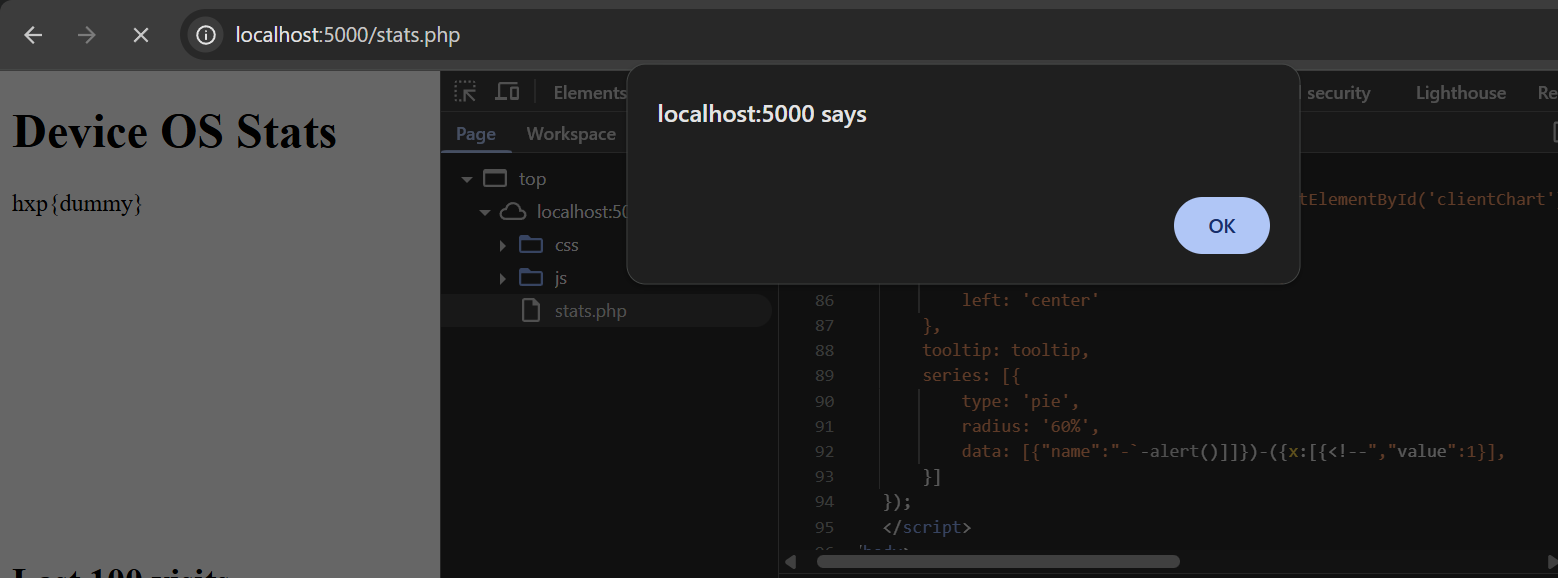
Success! All syntax issues are fixed, and our alert() executed. To get the flag, we simply have to change our payload to something that reads the flag in document.body.innerText, followed by a location= change to our attacker's server, which bypasses the connect-src CSP.
After requesting index.php with this user agent, and triggering the bot, we receive the flag in our logs:
HTTP/1.1 ? HTTP/1.1I was really impressed by how this challenge was barely solvable with lots of creative techniques, all with the gadgets that a real-world library gives you. We learned some useful tricks in JavaScript injections with limited charsets, and how useful it can be to automate and exhaust all options instead of doing everything manually.